1080p WiFi Bluetooth Projector + Screen: 300″ Setup Tips
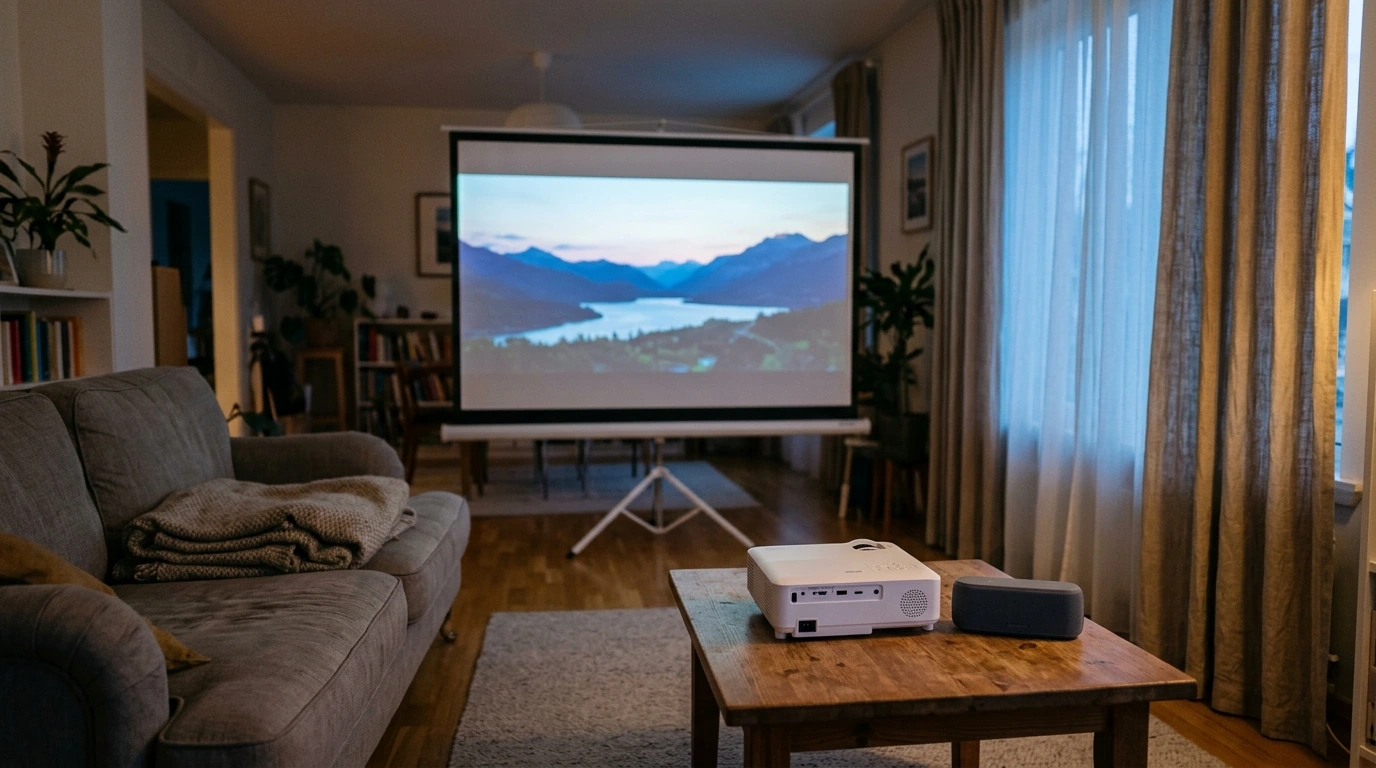
1080P WiFi Bluetooth Projector with Screen: What to Expect from a Portable 300″ Home Theater
A portable projector can turn a living room, bedroom, or backyard wall into a big-screen setup in minutes. A bundle that combines 1080P resolution with WiFi casting, Bluetooth audio, and a dedicated screen is designed for flexible, “set it up when you want it” viewing—without committing to a permanently mounted TV. Below is a practical guide to what typically comes in the box, where this type of setup shines, and how to get a sharper picture and better sound fast.
What comes in a portable projector-and-screen setup
Projector-and-screen bundles are built to reduce friction: you can go from unpacking to watching with minimal extras. While specific ports and accessories vary by model, most setups in this category include the essentials for casual home theater use.
- Projector unit for video playback from streaming sticks, phones, laptops, or media players.
- Projection screen for a cleaner, more uniform image than many painted walls (often improving perceived contrast and reducing “texture” artifacts).
- Power and basic connection options (commonly HDMI/USB and an audio output depending on the model).
- Wireless features: WiFi for casting/streaming workflows and Bluetooth for pairing speakers or headphones.
If you want a simple, all-in-one starting point, the 1080P WiFi Bluetooth Projector with Screen, Portable Home Theater up to 300″ is an easy way to cover both image and screen from day one.
Quick specs snapshot
For most homes, 1080P is a sweet spot: sharp enough for movie nights and sports, while still easy to drive from affordable streaming devices. The “up to 300 inches” claim is best treated as a maximum; in real rooms, image size is a trade-off between brightness, throw distance, and how much ambient light you can control.
| Item | Detail |
|---|---|
| Product | 1080P WiFi Bluetooth Projector with Screen, Portable Home Theater up to 300″ |
| Resolution | 1080P |
| Max image size | Up to 300″ |
| Wireless | WiFi + Bluetooth |
| Includes screen | Yes |
| Price | 202.01 USD |
| Availability | In stock |
For deeper background on the standards behind the connections you’ll use most, see the official references from HDMI.org, the Wi‑Fi Alliance, and the Bluetooth SIG specifications index.
Where this setup works best
- Living rooms and bedrooms where a large TV feels too permanent, too pricey, or simply too small for group viewing.
- Apartments and rentals where wall-mounting isn’t ideal and storage matters.
- Backyard or patio movie nights with a portable screen—best after dusk for richer blacks and stronger contrast.
- Travel, RV, and pop-up events where quick setup beats permanent installation.
Small-space comfort improves quickly with smart furniture placement and multipurpose zones. For layout ideas that support a temporary “cinema mode” without leaving your room feeling crowded, consider the Maximize Function, Minimize Clutter | Multifunctional Room Layouts eBook | Small Space Design Guide | Space-Saving Furniture & Smart Home Ideas.
Getting a sharper picture in 10 minutes
Most “soft picture” complaints come from placement, focus habits, or too much ambient light. A few adjustments usually deliver a noticeable upgrade without changing any settings.
- Square the projector to the screen: align it so the lens faces the screen head-on. This reduces keystone distortion and keeps edge sharpness more consistent.
- Start with a moderate image size: begin smaller, then scale up. As the image grows, brightness and edge sharpness are easier to judge.
- Control light first: dim lamps, close blinds, or add blackout curtains. Darker rooms make colors look richer and blacks look deeper.
- Focus for the edges: pull up a menu, subtitles, or a grid pattern and adjust focus until text near the corners looks crisp—not just the center.
- Stabilize the surface: use a steady table, shelf, or tripod. Minor vibrations can throw alignment off and make the picture feel “less sharp.”
Connecting video sources: WiFi casting vs HDMI
Wireless casting is great when convenience is the priority, but the most consistent movie-night experience still tends to come from a wired source. Think of WiFi as the fast “share something now” option, and HDMI as the “sit down and watch a full feature” option.
| Use case | Best connection | Why it helps |
|---|---|---|
| Full-length movies | HDMI from streaming stick/laptop | More consistent playback and fewer drops |
| Quick clips/photos | WiFi casting/mirroring | Fast and cable-free |
| Gaming | HDMI | Lower latency than most wireless options |
| Better audio | Bluetooth to speaker/soundbar | Louder, clearer sound than built-in speakers |
Upgrading the sound with Bluetooth
Room setup tips for a more comfortable “big screen” feel
If your space doubles as an office, playroom, or guest room, a simple declutter-and-reset routine can make setup faster. The One Room, Real Progress: A Simple Step-by-Step Guide for Stress-Free Home Organization pairs well with a portable projector lifestyle because the room can switch modes without a major rearrangement.
FAQ
Is a 300-inch image practical for everyday watching?
300″ is best viewed as a maximum capability. For everyday use, start with a smaller image size and increase gradually until brightness, sharpness, and seating distance feel comfortable for your room’s lighting and throw distance.
Why does wireless casting sometimes lag or stutter?
Lag is commonly caused by WiFi congestion, weak signal strength, or higher-bitrate video that’s harder to transmit smoothly. Moving closer to the router, using a less crowded band when available, reducing other network activity, or switching to HDMI typically improves stability.
Can Bluetooth speakers cause audio delay?
Yes, some Bluetooth connections introduce latency depending on the codec and the speaker. If delay is noticeable, try minimizing distance/interference, adjusting any available AV sync settings, or using a wired audio output if your projector supports it.




Leave a comment