ChatGPT for Beginners: Prompts, Safety, and Quick Wins

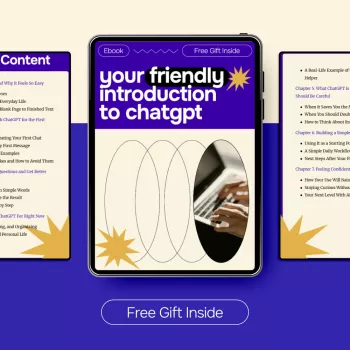
Your Friendly Introduction to ChatGPT: A Calm, Clear First Step for New Users
ChatGPT can feel like a big leap at first—especially if new tools usually come with a learning curve. Our beginner-friendly eBook is built to make your first experience simple and comfortable: what to ask, how to ask it, and how to get useful results you can trust and reuse in real life. You’ll learn a steady, repeatable approach that helps you move from “What do I even type?” to “This actually saved me time.”
Who This eBook Is For (and What It Helps You Do Right Away)
If you’re brand-new (or you tried once and stalled), you’re in the right place. Our team wrote this guide for practical everyday use—no jargon, no pressure, and no expectation that you already know how any of this “should” work.
- First-time users who want a gentle start without complicated setup
- Busy learners who want quick wins: drafting, summarizing, brainstorming, planning, and polishing
- Students, job seekers, creators, and small-business owners who want a repeatable workflow
- Anyone who opened ChatGPT, typed one line, and didn’t know what to do next
A Simple Way to Start: The “Goal + Context + Format” Habit
The easiest way to get helpful answers is to build one small habit. Every time you ask for help, include:
- Goal: the outcome in one sentence (what success looks like)
- Context: who it’s for, what matters, and any must-include constraints (tone, length, deadlines, examples)
- Format: the shape you want (bullets, table, outline, email draft, steps, checklist)
Then add one line that keeps things safe and accurate: “Ask me 3 questions before you answer if anything is unclear.” This prevents the most common beginner problem—getting a confident-sounding answer to the wrong task.
Quick Prompt Starters to Copy (Beginner-Friendly)
| Use case | Copy-and-paste prompt |
|---|---|
| Learn a topic | Explain [topic] like I’m new to it. Use simple language, then give 3 examples and a 5-question quiz. |
| Write an email | Draft an email to [who] about [topic]. Tone: [friendly/professional]. Include: [details]. Keep it under [X] words. |
| Summarize | Summarize this in 6 bullets for a beginner audience. Highlight any key numbers, dates, and action items: [paste text] |
| Brainstorm | Give me 20 ideas for [goal]. Make them varied. Then group them into 4 themes and recommend the best 3 to start with. |
| Plan | Create a step-by-step plan to achieve [goal] in [timeframe]. Include milestones, a weekly schedule, and common obstacles + fixes. |
How to Get Better Answers (Without Getting Technical)
You don’t need special commands to improve results. Small, plain-language adjustments make a big difference:
- Be specific about tone and audience: “Write for a complete beginner,” “sound warm but concise,” “avoid buzzwords.”
- Set boundaries: “Do not invent facts; if unsure, ask clarifying questions or list what you’d need.”
- Request options: “Give 3 variations,” “offer 5 headlines,” “provide two approaches: quick and thorough.”
- Iterate with small edits: “Shorten by 20%,” “make it more upbeat,” “add 2 examples,” “turn this into a checklist.”
- Use roles carefully: “Act as a tutor,” “act as an interviewer,” or “act as an editor” to guide style and structure.
If you want a reliable routine, ask for a draft first, then follow up with one improvement request at a time. You’ll stay in control, and the writing will sound more like you.
Everyday Ways to Use ChatGPT (So It Actually Saves Time)
ChatGPT is most useful when you treat it like a fast assistant for first drafts and structured thinking. Here are practical, repeatable uses you can try right away:
- Writing support: outlines, first drafts, rewrites for clarity, tone adjustments, proofreading checklists
- Study and learning: simple explanations, practice questions, flashcards, topic summaries
- Work and admin: meeting agendas, action-item lists, standard operating procedures, reusable templates
- Decision support: pros/cons lists, comparing options you provide, risk/benefit questions to consider
- Creativity: brainstorming names, content ideas, story prompts, variations on a theme
A helpful mindset: you bring the real-life details; ChatGPT helps you shape them quickly into something usable.
Practical Safety: What Not to Share and How to Fact-Check Outputs
Our team wants you to feel confident using ChatGPT responsibly. A few simple habits go a long way:
For additional guidance, you can review the OpenAI Help Center, the OpenAI Usage Policies, and the NIST AI Risk Management Framework (AI RMF 1.0).
What You’ll Walk Away With After Finishing This Guide
Recommended Downloads from Our Store
- One Room, Real Progress: A Simple Step-by-Step Guide for Stress-Free Home Organization
- Maximize Function, Minimize Clutter | Multifunctional Room Layouts eBook | Small Space Design Guide | Space-Saving Furniture & Smart Home Ideas
FAQ
Do first-time users need technical skills to use ChatGPT?
No. You can get strong results using simple, everyday instructions, and our guide walks you through clear examples and small practice steps so you feel comfortable quickly.
What should a beginner type as a first prompt?
Use this template: “Goal: [what you want]. Context: [who it’s for, any constraints]. Format: [bullets/email/steps]. Ask me 3 questions if anything is unclear.” A simple first try is asking for a short email draft or a beginner-friendly summary.
Can ChatGPT be wrong, and how do beginners avoid mistakes?
Yes, it can be inaccurate or overly confident. Stick to safe habits: ask it to flag uncertainty, spot-check key facts (names, dates, numbers), and verify anything important with trusted sources before you rely on it.



Leave a comment